Amazon Products


Showing posts with label android. Show all posts

Monday, November 19, 2012

Why Can’t You Add The Google Play App Store To Kindle Fire HD – Makes No Sense

SEE ALSO:  The New Kindle Fire HD — Only $199

One thing that frustrates me more than anything is why Amazon doesn’t allow Google Play – Google’s Android app store – to be installed on the Kindle Fire HD.  Certainly, Kindle Fire HD’s have been flying off the shelves over at Amazon.  And with the holiday season, this trend will continue is overly aggressive fashion.

But outright preventing the installation of Google Play onto the Kindle Fire HD?  Really?

This is not only frustrating to so many unsuspecting Kindle Fire HD buyers, but also a bit perplexing as to why Amazon would do this!

I know, I know… Amazon is ultimately forcing everyone onto their store via the Amazon App Store.

So now, the only way people are installing Google Play onto the Kindle Fire HD tablets is by simply rooting the device.  But of course, once you root your Kindle Fire HD you immediately discredit the warranty associated with it.

I would have thought Amazon would want to do whatever they can to encourage more people to buy their Kindle Fire HD tablets.  But by not allowing the Google Play store to be installed is creating more of a backlash than anything else.

Sure, you can get apps from Amazon’s app store, but it’s nothing like having the lineup of apps you get from Google Play.

What do you think about this?  Do you find it frustrating that Amazon is not allowing easy, or pre installed, access to Google Play on their Kindle Fire HD’s?


Source : feedproxy[dot]google[dot]com

Thursday, November 8, 2012

New data showing Windows 8 beating Android in web traffic, but how?

This image has no alt text

If this latest data from internet traffic analytics firm StatCounter is to be believed, it appears that over the weekend the 2 week old Windows 8 somehow managed to overtake Android in total amount of web traffic. If you feel like someone’s fed you crazy pills, you’re not the only one. Keep in mind, this data represents both desktop and mobile devices (including tablets), but with the sheer amount of Android devices on the market, how could this even be possible?

This could have something to do with the fact that people spend more time at home surfing the web on their Windows 8 desktops than when out and about on their Android devices. We also don’t know if StatCounter’s data is also accounting for Windows 8 release candidates that launched back in June. but even then, the data is still a bit puzzling. Any idea what this could mean? Also, what happened the first few days of November that caused Android web traffic to drop so suddenly?

[WinSource]


Source : androidtabletblog[dot]com

Don’t Do.com for Android until the app gets an update

During a recent round of updates to the Do.com social task management application, Salesforce launched the Do Social Productivity app for Android. It joins their free Do - Social Productivity iPhone app for enabling users mobile access to their Do.com projects and tasks. I use Do.com for managing some reoccurring midsize projects, so I recently spent some time using their new app on a Google Nexus 7 tablet. While you can use it from an Android smartphone, the app makes nice use of the extra screen real estate tablets offer.

When you open the app, you have the option to login using either a Google Apps or Do.com account. If you don’t have a Do.com account yet, you have the option to create a new account directly from the app.

Automatically sign up for our Tablets in the Enterprise newsletter!

Create tasks

When you open the Do Social Productivity app, a list of your assigned and available tasks greets you. The tasks are written in white text on a black background, which can be harsh on the eyes. It’s the one part where the fabled Salesforce user experience stumbles in this app. I found the white text on a black background hard to read even on a tablet. Figure A shows an example of the task list.

Figure A

The task list shows your tasks by section.

When you tap the plus sign [+], it brings up the Create a Task screen (Figure B). I tried to assign a task to another user, but the assignees feature wasn’t picking up anybody from my address book or the test email addresses that I shared with the project. However, a Salesforce representative said that the Do development team is about to submit an update to Google Play that will allow users to add new assignees via an email or through the device’s address book. On a brighter note, the calendar interface for the due date is well designed and easy to use.

Figure B

Create a Task screen.

Unfortunately, when I tried to add the task to an existing Do project, the Do Android app crashed repeatedly, and I was never able to get the feature to work when I was writing this post. I followed the prompts to report the crash, which brings up a rather intimidating Google legal agreement that you have to accept or decline before sending notice of the crash and your system data to the minds at Google. On a corporate or BYOD tablet, this would be inexcusable. The only workaround at this time is to add tasks from the web and only use the mobile app to strike tasks from your Do.com project.

Access and create projects

The Projects list is way more readable than the list of tasks. You can scroll through all of the projects you have access to in Do.com, with direct links to Tasks, Projects, and Notes. The scrolling was responsive on my Nexus 7 tablet. Figure C shows how the Do app presents Projects.

Figure C

Projects in the Do Social Productivity app.

You can create new Do.com projects using the Android app. It works like a charm. To add insult to injury, actions like finding assignees and creating a new task worked flawlessly in the new project I just created. Figure D shows the Create a Project screen.

Figure D

Create a new project in Do.com.

Add Notes

The notes feature (Figure E) is pretty bare bones as note-taking features go. One immediate reaction is you can only type text above the line in the note — it’s not a space for a heading (if it is, then that’s another thing that didn’t work for me in this app). The notes I entered using the Do Social Productivity app didn’t synchronize back to my Do.com project.

Figure E

A blank note in Do.com.

Wait for the update

While the web version of Do recently gained Do Contacts, a contact management feature, and Do Deals, a lightweight CRM feature, you’ll have to wait for these to appear on the Do Android app. However, if you have a task associated with a Deal or Contact from the web app, it will still appear in the Android app.

The Do Social Productivity App for Android has great potential, but the readability issues and multiple crashes make it seem like a beta app when put up against the high quality Do.com cloud application. I can’t recommend this app right now, because the significant quality issues make it unacceptable for business users. I advise waiting in hopes the development team resolves the quality issues and delivers an update on par with the Do.com social task management application.


Source : techrepublic[dot]com

Wednesday, November 7, 2012

Microsoft Office for Android will require Office 365 subscription

If you’ve been patiently awaiting the arrival of Microsoft Office for Android, you’re not alone — we’re curious to see how Microsoft treats its Office suite on competing platforms. While we’ve known about its early 2013 launch since, well, almost forever, The Verge’s news that it’s coming in the first quarter of the year is nothing shocking or surprising.

The outlet did get a few details on how things would be carried out from a licensing standpoint, though. According to its sources, Microsoft Office for Android (and iOS, we imagine) will require an Office 365 subscription to get the most out of the suite of tools. With it, you’ll be able to both view and edit documents on the go.

For those just wanting to view documents you do need a Microsoft account but those are free and easy enough to sign up for. We’re told not to expect nearly the same deep level of editing that you can get on the desktop suites, and that’s fine — we weren’t expecting much to begin with.

But you have to wonder whether or not the official suite will be enough to make current third party options seem useless. I got a full editing suite from a Google Play Store sale for $.25, and it does just fine for me.

Even at the typical prices of $10 and $15 we usually see these apps go for, that’s a one time fee. We’re not sure if Microsoft is planning to introduce a new tier for its mobile apps, but for comparison purposes the current cheapest plan costs $4 per month, which amounts to $48 per year.

We won’t know what, exactly, the software giant will end up doing until we inch closer to that Q1 2013, but these early details aren’t leaving the best taste in my mouth. Anyone else not feeling the love from Microsoft or are you just happy to see that the company is supporting Android at all?


Source : androidtabletblog[dot]com

Titanium Backup for root users gets new flashable zip backups Titanium Backup for root users gets new flashable zip backups

This image has no alt text

Easily one of the most useful apps to ever come out of the Android Market, the fan favorite Titanium Backup (Pro) saw a noteworthy update in the Play Store today. One of the most important tools in any ROM flashers utility belt, Titanium Backup was one of the first apps ever to give rooted users the ability to backup all their apps (including data) onto their SD card/internal storage.

Today, the app was updated to version 5.7.0 and now gives users the option of creating flashable zip files of their backed up apps, cutting down on the lengthy restore process. Now, you can zip up your must-have apps and/or their data, and flash them quickly from recovery whenever you jump to a new ROM. This was a much requested feature and as usual, developer Titanium Track listened to customer feedback. The feature is only enabled for the Pro unlocked version of Titanium Backup and can be downloaded from the Play Store for $7.

[Play Store Link]

This image has no alt text

Easily one of the most useful apps to ever come out of the Android Market, the fan favorite Titanium Backup (Pro) saw a noteworthy update in the Play Store today. One of the most important tools in any ROM flashers utility belt, Titanium Backup was one of the first apps ever to give rooted users the ability to backup all their apps (including data) onto their SD card/internal storage.

Today, the app was updated to version 5.7.0 and now gives users the option of creating flashable zip files of their backed up apps, cutting down on the lengthy restore process. Now, you can zip up your must-have apps and/or their data, and flash them quickly from recovery whenever you jump to a new ROM. This was a much requested feature and as usual, developer Titanium Track listened to customer feedback. The feature is only enabled for the Pro unlocked version of Titanium Backup and can be downloaded from the Play Store for $7.

[Play Store Link]


Source : androidtabletblog[dot]com

Monday, November 5, 2012

Android Director Talks Nexus Development, Details Prices of Devices

The folks of NY Times recently sat down with John Lagerling, the director of business development for Android and asked him a few questions. From the series of questions we found out stuff like the reasons of the Nexus device pricing, Nexus development and more.

Lagerling claims that his favourite feature of the new Nexus devices is the 360 degree panoramic photo, called Photo Sphere. There’s also the ability to do inductive charging, so you don’t have to bother with a plug. He also describes the Nexus 10 as very thin and light and the resolution is very good, at 2.5K, so the pics are very crisp and so is the text. The most interesting question was how Google managed to keep prices of the new Nexus devices so low.

John Lagerling said that they didn’t want to charge people $600 for a phone belonging to the latest generation. He felt the current prices are unreasonable and mentioned the Nexus 7 as positive example for pricing. The choice of price, $299 for Nexus 4 and $399 for Nexus 10 is the best Google could achieve for these models. The official said that he felt the 10 inch tablets were underpowered and overpriced and this is where Samsung jumped in and saved the day. More insight into the Nexus devices can be found in the source link!

Related posts:

  1. Nexus 7 Spotted Running Android 4.2, New Mystery Manta and Occam Devices With the Same OS Spotted
  2. Samsung Nexus Tablet Supposedly Coming on October 29th, Other Cool Devices Too
  3. ASUS Nexus Tegra 3 Tablet called Nexus 7 Leaked? Android Jelly Bean is in Fact Android 4.1?!


Source : androidtabletblog[dot]com

MegaRamp skateboarding and BMX game sneaks into Play Store for Xperia devices

Sony Mobile hasn’t made a ton of noise regarding its arrival, but the company — in conjunction with developer has released MegaRamp for Android. The game leverages the MegaRamp license for the use of real ramps, locations, and pros to bring you an authentic boarding and BNX experience. Those who enjoy this sort of stuff might be interested, especially for just $2.89.

The problem is that the game is exclusive to Sony Xperia owners. It’s a shame considering it looks pretty decent, but many of you will have to hope that this period of exclusivity is only temporary.

That might not be a dream I’d hold on to, though, as the official trailer shows Sony’s influence throughout various areas of the game. Perhaps it can be reskinned later on, but for now there’s no sign that those of us without Xperia devices will have the chance to enjoy it.

But if you’ve got an Xperia device and you want to get in on some MegaRamp fun then there’s nothing stopping you. The game includes achievements and trophies, nearly 100 tricks between BMX and skateboarding, locations like Zurich, the USA, Mexico City, and tricksters like Danny Way, Kevin Robinson and Adam Taylor.

This likely won’t hold a candle to EA’s Skate or even older versions of Activision’s Tony Hawk Pro Skater, but for $3 we’re sure some of you will find something to like in this mobile package. If you have the hardware to match be sure to find it available for download in the Google Play Store. Oh, and be sure to watch the trailer above, horrible dubstep music and all.

[via Facebook]


Source : androidtabletblog[dot]com

Thursday, November 1, 2012

LIFX Android powered lightbulb raises $1.3 million, sells out of Kickstarter backings

This image has no alt text

Seems Google may have missed a golden opportunity when they announced Android@Home but never followed through with any actual products. Still, that hasn’t stopped others from making their own attempts at a connected home, like these colored LED bulbs from LIFX.

We told you guys about ‘em back in September and if you didn’t think there was much of a market for Android-controlled LED bulbs, you’d be wrong. The Kickstarter project still has 13 days left to spare and just today it has completely sold out of its backing tiers, hitting $1,315,266 of their modest $100,000 goal. Not bad, LIFX. Not bad.

Inside the bulbs are multiple colored LED’s inside and a WiFi transmitter used to control the bulb using the handy Android (or iOS) app. I admit, I couldn’t quite find the appeal of changing the lighting in my room from white to red (aside from late night booty calls), especially at $70 a pop. But, after checking out the info page, you’ll notice there’s a lot of cool stuff you can do with connected light bulbs. For one, you can have the bulbs flash when you receive a notification on your phone, or change the light from bright white, to warm and dim right before bedtime. When it comes to safety, you can set the bulbs to automatically power on when you approach your home and set them to power on while your away on vacation. Definitely cool in a geeky kinda way.

With no way of getting in on LIFX’s early Kickstarter campaign, you can still sign up to be notified when these finally hit the market. That doesn’t mean LIFX isn’t without competition. Philips recently released their own connected light bulbs, complete with Android app called Hue, which are currently being sold in Apple stores. Looks like we’re getting one more step closer to controlling our entire lives with our smartphones. What do you guys think? Android-controlled light bulbs: hot or not?

[LIFX via Kickstarter]


Source : androidtabletblog[dot]com

Monday, October 29, 2012

There are now 700,000 Android apps in the Google Play Store

This image has no alt text

With the news of shiny new Google devices bombarding your your favorite media outlets today, I think it’s safe to say today was a huge day for Android. But, besides a slue of new Nexus devices soon making their way to your doorsteps, there’s still a few stories left unsung. Apparently, the Google Play Store has officially reached its 700,000 apps milestone. This, according to Bloomberg, and while we await an official announcement/blog post from Google HQ, this is still another big milestone for company who at one time was ridiculed for having a less than robust app market place.

By comparison, the Apple App Store hit the same 700K mark back in September of this year, at which time there were 675,000 apps in the Play Store. And while this sounds great on paper, rummaging through that many apps is a daunting task for anyone, with many quality apps getting lost in the shuffle. Don’t worry, we’ll continue letting you guys know whenever a good one comes our way. Pinky promise.


Source : androidtabletblog[dot]com

Saturday, October 27, 2012

First impressions: Xbox SmartGlass for Android (Update)


Today is a good day for Xbox users with an Android smartphone. Microsoft has finally released the Xbox SmartGlass Android app, and we have been playing around with it for a bit. SmartGlass promises a second screen to use with the Xbox 360, much like the WiiU and its gamepad.

As the feature develops, one will be able to access secondary menus and options with a smartphone or tablet, without interrupting your game or media. During Microsoft’s demo, a tablet was able to access information about the battlefield while watching video of a war in the popular series Game of Thrones. That level of interactivity definitely seems like a step forward as we approach a new era in video gaming.

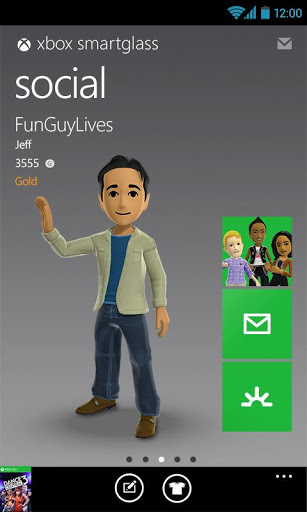
The app doubles as a SmartGlass and Xbox Live app. One has access to messages, friends, currently-played games/apps and even featured content. On the SmartGlass side, one is able to use an Android device as a form of remote control for the Xbox 360. You can easily navigate around the dashboard, and open any games or apps of your choice; all by sliding and tapping your finger on the navigation screen (reminds me of a mouse app for Android and PC).

The new app has its good and bad sides, so let’s just jump in and see what we have.

The Good

Xbox SmartGlass has all those features we are salivating over (even if not perfect yet), but there is more to it. Xbox 360 junkies will be able to have a central app, allowing them to access Xbox Live content on-the-go. I have been using it to read and send messages, look for new games and search for apps. If you are interested in any of the content found on the device, you can go ahead and pull it out on your Xbox by simply tapping a button. One can purchase it from there.

Likewise, there are other shortcuts and features that are very helpful. Everything from being able to search and access content to enjoying Play, Rewind and Forward shortcuts appearing under the navigation screen when playing a movie on Netflix.

The Bad

Because it is made by Microsoft, it’s to be expected that Windows Phone will get the better end of the stick. Certainly, the app is good, but it feels like it is not fully developed, but it could also be an issue of SmartGlass, itself. With that said, there are some faults we wish to see improved in the near future.

For one, the Dashboard navigation screen is a bit laggy. We must consider the device communicates with the Xbox via internet, so that should definitely make it a bit slower. The interface is also a designed oddly. It seems like a pressed down Xbox 360 interface instead of an Android app. It is a form of mix between the Xbox UI and the Windows Phone Metro UI, which makes it feel very out-of-place.

All aesthetics aside, the app does need some functional improvements. It is quite annoying to see that even when the app is left open, it has to sign back in if the screen goes to sleep and you turn the device back on. If you hit the home button and re-open the app, it has to sign in again. Pretty much, it seems to lose connection with your Xbox every time you leave the app. It could be a battery-saving “feature,” but it would be nice to have the option to keep a stable connection.

Another noticeable issue is that the navigation screen is not very helpful when using it to control the pointer (with the browser, for example). Navigation works perfectly for the Dashboard and apps as the Metro UI lets you jump to categories and tiles one by one. It gets very hectic when you are trying to use the pointer, though. The SmartGlass navigation screen is no use, the pointer moves like a millimeter per full swype. It is simply unusable, so you might as well pick up your controller and use that.

For some reason, I have also not been able to use the keyboard, even though there is a shortcut for it. I just can’t pull it up, whether it is in the browser, the Search Box or within an app.

Verdict

As you can see, the app has more downsides than I expected. Over all, it works for what it is intended for, but Microsoft has a lot of work to do. We need a bit smoother navigation, better shortcuts and a working keyboard. Not to mention full compatibility with at least all native apps.

I have not tried the Windows Phone app yet, but I sincerely hope it is better than the Android one. Ultimately, SmartGlass has huge potential. Let’s hope it evolves into all that Microsoft promised and other developers make great features for it.

I have been here breaking my head over it, thinking maybe I was doing something wrong. If you have been using SmartGlass and have found these (or more) issues, please let us know! If not, you can go ahead and download it straight from the Google Play Store. As for me, I will start using it more once it becomes more integrated and seamless.

CAM00062 CAM00064 smartglass smartglass-1 smartglass-2 smartglass-3 smartglass-4

Update

The slow pointer and keyboard issues were fixed after connecting my Android smartphone to the same WiFi connection as the Xbox. I happen to prefer using Verizon’s 4G LTE, so I almost never connect my device to my home WiFi.

I definitely apologize for this misunderstanding, but that brings another issue. The app certainly connects to my Xbox and does other things when not on the same network. Why not make these features available regardless of how the device connects to the internet?

Thanks, ego!


Source : androidtabletblog[dot]com

Sponsored Links

Amazon Products