Today is a good day for Xbox users with an Android smartphone. Microsoft has finally released the Xbox SmartGlass Android app, and we have been playing around with it for a bit. SmartGlass promises a second screen to use with the Xbox 360, much like the WiiU and its gamepad.
As the feature develops, one will be able to access secondary menus and options with a smartphone or tablet, without interrupting your game or media. During Microsoft’s demo, a tablet was able to access information about the battlefield while watching video of a war in the popular series Game of Thrones. That level of interactivity definitely seems like a step forward as we approach a new era in video gaming.
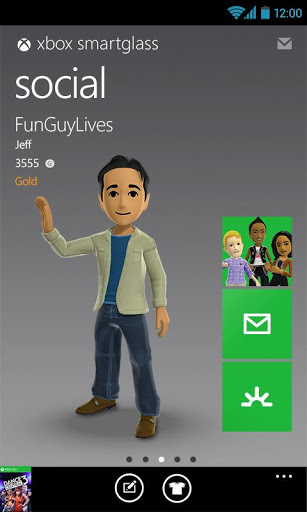
The app doubles as a SmartGlass and Xbox Live app. One has access to messages, friends, currently-played games/apps and even featured content. On the SmartGlass side, one is able to use an Android device as a form of remote control for the Xbox 360. You can easily navigate around the dashboard, and open any games or apps of your choice; all by sliding and tapping your finger on the navigation screen (reminds me of a mouse app for Android and PC).
The new app has its good and bad sides, so let’s just jump in and see what we have.

The Good
 Xbox SmartGlass has all those features we are salivating over (even if not perfect yet), but there is more to it. Xbox 360 junkies will be able to have a central app, allowing them to access Xbox Live content on-the-go. I have been using it to read and send messages, look for new games and search for apps. If you are interested in any of the content found on the device, you can go ahead and pull it out on your Xbox by simply tapping a button. One can purchase it from there.
Likewise, there are other shortcuts and features that are very helpful. Everything from being able to search and access content to enjoying Play, Rewind and Forward shortcuts appearing under the navigation screen when playing a movie on Netflix.
The Bad
Because it is made by Microsoft, it’s to be expected that Windows Phone will get the better end of the stick. Certainly, the app is good, but it feels like it is not fully developed, but it could also be an issue of SmartGlass, itself. With that said, there are some faults we wish to see improved in the near future.
For one, the Dashboard navigation screen is a bit laggy. We must consider the device communicates with the Xbox via internet, so that should definitely make it a bit slower. The interface is also a designed oddly. It seems like a pressed down Xbox 360 interface instead of an Android app. It is a form of mix between the Xbox UI and the Windows Phone Metro UI, which makes it feel very out-of-place.
All aesthetics aside, the app does need some functional improvements. It is quite annoying to see that even when the app is left open, it has to sign back in if the screen goes to sleep and you turn the device back on. If you hit the home button and re-open the app, it has to sign in again. Pretty much, it seems to lose connection with your Xbox every time you leave the app. It could be a battery-saving “feature,” but it would be nice to have the option to keep a stable connection.
 Another noticeable issue is that the navigation screen is not very helpful when using it to control the pointer (with the browser, for example). Navigation works perfectly for the Dashboard and apps as the Metro UI lets you jump to categories and tiles one by one. It gets very hectic when you are trying to use the pointer, though. The SmartGlass navigation screen is no use, the pointer moves like a millimeter per full swype. It is simply unusable, so you might as well pick up your controller and use that.
For some reason, I have also not been able to use the keyboard, even though there is a shortcut for it. I just can’t pull it up, whether it is in the browser, the Search Box or within an app.
Verdict
As you can see, the app has more downsides than I expected. Over all, it works for what it is intended for, but Microsoft has a lot of work to do. We need a bit smoother navigation, better shortcuts and a working keyboard. Not to mention full compatibility with at least all native apps.
I have not tried the Windows Phone app yet, but I sincerely hope it is better than the Android one. Ultimately, SmartGlass has huge potential. Let’s hope it evolves into all that Microsoft promised and other developers make great features for it.
I have been here breaking my head over it, thinking maybe I was doing something wrong. If you have been using SmartGlass and have found these (or more) issues, please let us know! If not, you can go ahead and download it straight from the Google Play Store. As for me, I will start using it more once it becomes more integrated and seamless.


Update
The slow pointer and keyboard issues were fixed after connecting my Android smartphone to the same WiFi connection as the Xbox. I happen to prefer using Verizon’s 4G LTE, so I almost never connect my device to my home WiFi.
I definitely apologize for this misunderstanding, but that brings another issue. The app certainly connects to my Xbox and does other things when not on the same network. Why not make these features available regardless of how the device connects to the internet?
Thanks, ego!
Source : androidtabletblog[dot]com